
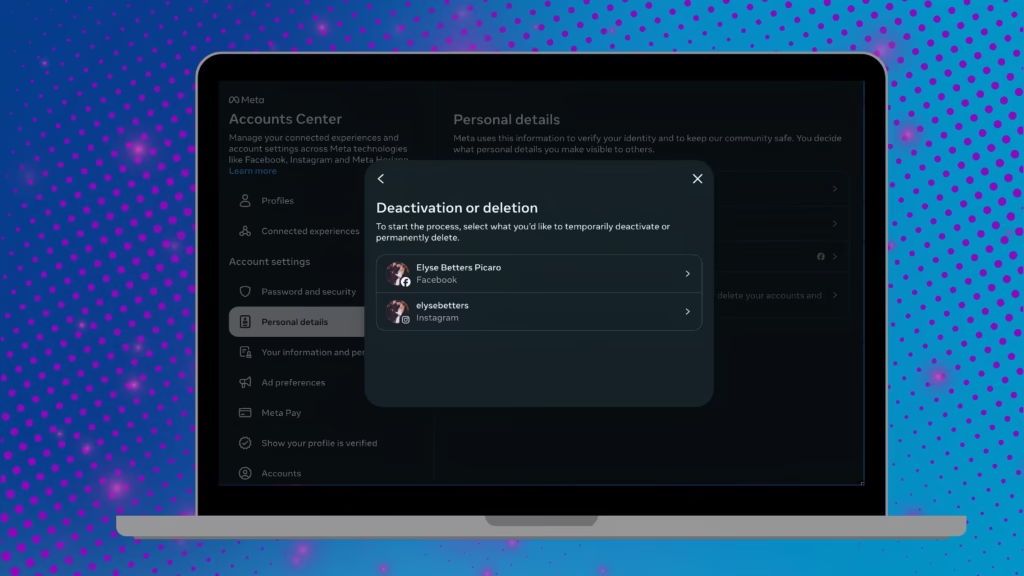
Thinking about quitting Facebook for good? You’re not alone. In 2025, millions of users worldwide are rethinking their social media presence — opting for temporary social media detoxes or cutting ties completely with Meta platforms. If you’re among those considering deleting Facebook, it’s important to know how to secure your personal data, download your photos, and fully disconnect your third-party logins before you go.
At Digital Naseeb, we guide users through smart digital privacy practices, social media management, and data security tips to help you take full control of your online footprint. Here’s the step-by-step guide to safely deleting your Facebook account in 2025.
1. Remove Third-Party Facebook Logins
Over the years, many apps — from Spotify to DoorDash — have allowed users to log in via Facebook. But when you delete your account, those linked logins will stop working. Before you delete Facebook, you’ll need to disconnect every third-party app.
Follow these steps:
-
Log in to Facebook.
-
Go to Settings & Privacy > Settings > Apps and Websites.
-
Select Remove next to each connected app.
-
Set up new passwords or link your accounts using Google or other options.
This ensures you won’t lose access to other services once Facebook is gone.
2. Decide Between Deactivation and Deletion
Facebook gives you two main options — Deactivate or Delete your account.
-
Deactivation is temporary. Your profile remains hidden, but your messages and settings are saved. You can return anytime by signing back in.
-
Deletion is permanent. After 30 days, all your data, photos, and posts are erased forever.
If you’re unsure, try deactivation first for a social media break without the commitment. But if you’re ready to go, deletion ensures you fully separate from Facebook’s data ecosystem.
Learn more about social media privacy strategies and account management tools on Digital Naseeb.
3. Download Your Facebook Data
Before deleting Facebook, make sure to download a full copy of your account data — including your photos, posts, and videos.
Here’s how:
-
Log in to Facebook.
-
Go to Settings & Privacy > Account Center > Your Information and Permissions.
-
Select Download Your Information.
-
Choose All Time for date range and High for media quality.
-
Click Create Files and wait for an email confirmation.
Facebook will then prepare your data archive, allowing you to preserve your memories offline even after deletion.
4. Delete Facebook Permanently
Once your data is downloaded and third-party logins are updated, you’re ready to delete your account permanently.
Steps to delete:
-
Log in to Facebook.
-
Go to Settings & Privacy > Account Center > Account Ownership and Control.
-
Choose Deactivation or Deletion.
-
Select Delete Account and follow the instructions.
Facebook will give you a 30-day window if you change your mind. Simply log in within that time to cancel the deletion.
5. Protect Your Digital Presence Beyond Facebook
Deleting Facebook is just one step towards digital privacy and healthier social media habits. To safeguard your online reputation and maintain secure digital profiles, stay informed with expert guides from Digital Naseeb.
Explore more about:
-
2025 digital marketing trends
-
Account security and data recovery
Take charge of your online world — because true digital freedom starts with informed choices.
Would you like me to make this version more blog-friendly (with meta title, meta description, and featured snippet optimization for Google SEO), or keep it as a how-to guide format like above?








)
&description=&image=https://digitalnaseeb.com/wp-content/uploads/2025/12/how-to-delete-facebook-from-computer-6-1024x576.avif)